Page 1 of 1
Intra-Oral Camera Snapshot Software
Posted: Tue Oct 29, 2013 3:49 pm
by Justin Shafer
Want to use your Capture Button for an ebay camera?
OpenDental Plugin that can use the capture button on IntraOral Cameras
Blog:
http://justinshafer.blogspot.com/2014/0 ... -ebay.html
NEW Website if you would like to view the installation manuals or buy the program:
http://iocsnapshot.com
Contact me if you would like to buy it. $50.00 per operatory and I offer evaluation licenses if you would like to try it out.
Would you like to try an evaluation of my IOC Snapshot program?
http://iocsnapshot.com/IOC_Snapshot.exe
Install the program, after the install it will ask for a license, here is an evaluation license good for 2 weeks:
FgKgAbn1DnVVfNMBDgABAazs+ZYN7asqvRK3xuXZYrrsxdGRy+oE2cWV4NYFsWoxUE0ma8s0dRzjgaUTM8TXUA==
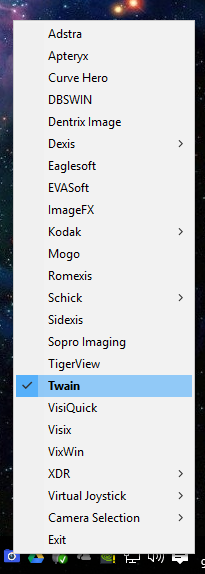
1. You will see a blue camera on in your system tray icons next to the time, right click it and go to Select Camera to set your camera.
2. Right click the blue camera and select Open Dental OR your x-ray program if you prefer that.
3. The PAID OpenDentalPlugin will now be in your Open Dental folder, set up the program link directions at the beginning of this post
viewtopic.php?f=1&t=6392. You can now enable the Still Pin option and One Click Capture option OR don't set either and my blue camera will do all the snapshots for you.
Re: Intra-Oral Capture Button Software
Posted: Tue Oct 29, 2013 4:08 pm
by Justin Shafer
nevermind
Re: Intra-Oral Capture Button Software
Posted: Tue Oct 29, 2013 7:03 pm
by gthiele
Works for the MD-960U MD-830UF MD-930 MD-749 BestCam and EZCap DC60+
Does anyone have pros & cons for these cameras? I'd like to purchase on eBay for my ops but not sure which would be better.
Re: Intra-Oral Capture Button Software
Posted: Wed Oct 30, 2013 7:09 am
by Epal
Thanks Justin. I do miss your posts at dental town but then again.. i have no idea what you are talking about ... way over my head.

Re: Intra-Oral Capture Button Software
Posted: Wed Oct 30, 2013 11:26 pm
by Justin Shafer
Epal wrote:Thanks Justin. I do miss your posts at dental town but then again.. i have no idea what you are talking about ... way over my head.
Thanks! That makes me happy, I have spent weeks on an IRC channel listening to guys I don't understand.

Getting closer to running.. SailFish OS\Open WebOS, Nemo.. and Gnome with Wayland.

Re: Intra-Oral Capture Button Software
Posted: Thu Oct 31, 2013 6:50 pm
by Justin Shafer
We need an installation video for Twain and Open Dental.. I think we do.
Should be done in an hour or so...
Done.
http://www.youtube.com/watch?v=WQAFg_fisOY
Re: Intra-Oral Capture Button Software
Posted: Fri Nov 01, 2013 4:57 am
by KevinVan
thanks for sharing your expertise in the matter... keep up the good work..
Re: Intra-Oral Capture Button Software
Posted: Fri Nov 01, 2013 6:53 am
by Justin Shafer
Thanks! Sharing is Caring!
-Manny
Re: Intra-Oral Capture Button Software
Posted: Wed Nov 27, 2013 10:07 am
by Justin Shafer
ONLY FOR AUTOHOTKEY!!
OLD NOTES
For Eaglesoft Imaging and most likely Schick... I use AutoHotKey. I setup a fake joystick that is a dummy joystick on Joy1 and Joy2 (for ES to listen on). I have autohotkey listen to the cameras virtual joystick as Joy3 (it is not the preferred joystick when you run joy.cpl, the dummy is)
Then have autohotkey with a setkeydelay of around 2000 and sending the f and s key without alt up and down in the keystrokes.. works great.
Posting for my own notes.. because I will not forget this AGAIN!

Thanks to DigiDocs manuals for the timing and me remembering just to use AHK.
This is what I use as the Dummy Joystick. VJoy 1.2 (The 2.x branch of VJoy is not compatible with PPJoy being installed)
http://headsoft.com.au/download/pc/VJoy ... erOnly.exe
VJoy is Joy1 and Joy2 and PPJoy is Joy3.
3Joy1 means the third joysticks first button.
This would go at the bottom of runme.ahk
SetKeyDelay, 2000
SetTimer, JoyStick, 400
Joystick:
3Joy1::
send {f}
send {s}
;SoundPlay, C:\Button\camera.wav
return
GRRR.. This would probably work fine on the 2580.. but not the 2860... Lets work on this some more. Testing an older version of ESI... Seems to be listening to the capture button on the Empia driver at the same time as emsample. Can't switch to BDA because Magenta never released a BDA driver.. Hmmmmm Test theory with ManyCam? Seperate the Empia Driver listening issue with the other theory of the Joystick being listened by 2 programs at once.. And then finally see if loading emsample AFTER the Live Video is running makes a difference.
Re: Intra-Oral Capture Button Software
Posted: Fri Dec 06, 2013 6:38 pm
by Justin Shafer
nevermind
Re: Intra-Oral Capture Button Software
Posted: Fri Dec 20, 2013 5:11 pm
by Justin Shafer
VixWin and GXPicture 2.7.2 had to tell the driver friendly name to be a GXC-300 Camera from the Friendly name in that driver. It is BDA Camera Driver (GXC-300) and that gets GXPicture to stop hogging the resources from emsample. Since this camera does not have a BDA Driver we cannot try to use VixWin without the emsample program relying on the driver alone. Nor do we have bdasample to play with since we don't have a BDA Driver to talk to. Either that or try unregistering the DXCapture.ocx (think that is it's name)..
I also swapped the GUID's in Snap and NewPicture in the INF though I don't think it was necessary.
Re: Intra-Oral Capture Button Software
Posted: Sat Mar 08, 2014 2:21 pm
by adrenalinedoc
Hi Justin,
I'm looking to install the MD-960 with Open Dental & XDR. Do you think you can remotely help me with this? You mentioned the cost per computer before, can you PM so we can set this up? Thanks
Re: Intra-Oral Capture Button Software
Posted: Sun Mar 09, 2014 4:01 pm
by Justin Shafer
Sorry I have been so out of touch with you guys regarding cameras.
817-834-2481 give me a shout during the week... I am usually there..
Re: Intra-Oral Capture Button Software
Posted: Sat Apr 26, 2014 12:56 am
by Justin Shafer
http://justinshafer.blogspot.com/2014/0 ... utton.html
Dexis 10 MD-740 DY-50 Capture Button Software
I made this for a doctor who wants to use Dexis 10, with an ebay intra-oral camera. I usually use the MD-830UF or the MD-960U cameras, but they seem to break around a year or so. So I decided to do some more work on the less expensive Empia 2580 cameras. This would be the MD-740, the DY-50, and the MD-930U cameras. All you have to do is download this exe, and stick it in startup. Tell Dexis to NOT ignore the Still Pin. That should do it! Enjoy!!!! Stick in in your startup folder.
http://www.onsitedentalsystems.com/EM2580_Dexis_10.exe
I will test XDR next.
Re: Intra-Oral Capture Button Software
Posted: Sun Jun 08, 2014 8:34 am
by Justin Shafer
Updated the program to support VJOY, and bug fixes...
Testing with Windows 8 x64.
Re: Intra-Oral Capture Button Software
Posted: Mon Jun 09, 2014 1:36 am
by Justin Shafer
What I am working on... no autohotkey or joysticks with this one...

Re: Intra-Oral Capture Button Software
Posted: Mon Jul 21, 2014 7:14 pm
by SYDMAR
Ho there, I am new to the forum. Just trying to look for the Capture button software .for MD740. I run Dexis 9.0
I tried d/ling your file but it fails. Any help in this regard is much appreciated
Re: Intra-Oral Capture Button Software
Posted: Thu Jul 24, 2014 6:56 am
by stjames70
Hi Justin,
I think it is pretty neat what you are doing and what you are sharing with the OD community. I think you should add a PayPal contribute button to your web site. I donate to software companies if they provide freeware that I use. I definitely would contribute to your efforts, and I think it would be great to give docs the opportunity to make voluntary donations.
-- My two cents.....
Re: Intra-Oral Capture Button Software
Posted: Thu Jul 24, 2014 8:01 am
by nwdentist
Hi Justin,
Ever had a chance to test GoodDrs intra-oral cameras and OpenDental?
 http://www.gooddrs.com/www/eng/PROC/boa ... =&keydate=
Cheers,
Re: Intra-Oral Capture Button Software
Posted: Thu Jul 24, 2014 4:10 pm
by Justin Shafer
Not yet.. Good Dr's has it's own capture button software, so it should be easy.
You will need a file called VideoDS, as I don't think that driver has Twain. It MIGHT though.
Call me if you want me to give it a go, should be a piece of cake. Send me a pm, no charge for 5 minutes of poking around.
The may use the Empia ET Driver, which I think, does have Twain. I also think that camera has the Empia 2780 Chip.
Re: Intra-Oral Capture Button Software
Posted: Sun Oct 05, 2014 6:01 pm
by Justin Shafer
Updated!
Version 4.10.00
EM2580 works regardless of drivers, capture pin or still pin, works with light shut off!
EM2860 fixed a problem with keystokes being done when the camera was not present!
Added Twain to EM2580.
Button presses are accurate.
Re: Intra-Oral Capture Button Software
Posted: Thu Oct 09, 2014 9:54 pm
by Justin Shafer
BRAND NEW (BEEN TESTED FOR 1 DAY AS OF 10/9/2014)
Version 4.10.950
Fixed MenuItem Selections!
EM2580 Fixed Eaglesoft Timer!
EM2860 made the camera detection faster, with less CPU usage if the camera is not present.
Re: Intra-Oral Capture Button Software
Posted: Sat Nov 15, 2014 1:38 pm
by bgrutter
Hey Justin,
I've tried to access the DL, but it directs me to your Blog instead of any file. I feel like I tried this a while back with the same results. Am I missing something?
Re: Intra-Oral Capture Button Software
Posted: Mon Nov 17, 2014 9:16 am
by bryz
Hi Justin,
Found your drivers via old dentaltown postings and eventually found your blog -- thanks for taking the time to put those together. My only question is it seems that my MD960U camera will only allow a maximum resolution selection of 640x480, although the product stated maximum 2MP = 1600x1200. Any thoughts? Thanks for any suggestions you might offer.
Re: Intra-Oral Capture Button Software
Posted: Mon Dec 22, 2014 2:26 pm
by Justin Shafer
No not really.. Mega-Pixel is .3
I should mention that to a friend in China... hehe...
Re: Intra-Oral Capture Button Software
Posted: Mon Dec 29, 2014 2:55 am
by Justin Shafer
Gave it a better installer, more organized. I hear Windows 8.1 has issues.. Going to test that next. Oh, I added Twain (VideoDS.ds) to the installer and added Open Dental to the menu selection.


Re: Intra-Oral Capture Button Software
Posted: Sun Feb 01, 2015 2:27 am
by pgor
Just installed Justin's button capture software for a MD-930U camera. I am using it with Kodak 6.11 software on a 40 inch HD tv. The results are brilliant. I have a few questions though:
Should I be using Kodak 'slow' or 'fast' in the drop down menu?
It seems to me that that multiple image capture is a two person operation. After an image is captured, the Kodak software has to be 'reset' (4th button from right on menu bar) to open a new capture window. Is this correct?
If the scanner is used in the OD images module, when I open the window for camera capture in Kodak the scanner starts up! Every time I want to use the scanner in OD images, I have to select the scanner from a drop down menu. Then if I want to use the camera through Kodak, I have first to go to OD Images module and select the camera from the drop down menu before the camera will activate in Kodak software. Any solutions?
Re: Intra-Oral Capture Button Software
Posted: Tue Feb 03, 2015 10:04 pm
by Justin Shafer
Thanks! It is a work in progress.. Though it seems to be in the final stages.
DON'T USE THE CAMERA AS A SCANNER IN KODAK! USE IT AS A CAMERA!
Run SetupSTV.exe or STVPROSetup.exe on the Kodak CD. Choose all 3 cameras to install. Open Kodak. You should have a drop down in the toolbar with 2 possible camera choices. Choose the one that works!
The Kodak Settings creates two F5 Keystroke events (just like hitting F5 on the keyboard, twice)
This SHOULD freeze and then capture.. (then go back to live video automatically)
ALSO: With Kodak sometimes you run the intraoral program in Kodak, and you will ONLY see a BLACK image until you hit the refresh button.. Do you ever run into that? I see that... and that is just a Kodak thing.
https://www.mymouthwatch.com/download/M ... _Kodak.pdf
Documentation provided by: MouthWatch Pro (they ALSO do installations\integration)..
Brant has been instrumental in making this program better... He embraced my idea and I wanted to improve my program AND make it easier to install. You should have seen what I used to make people do! rofl You had to use AutoHotKey and Virtual Joysticks.. many reboots.. test mode.. None of that now.
Win Win.
Re: Intra-Oral Capture Button Software
Posted: Sat Mar 14, 2015 7:01 pm
by Justin Shafer
Added the Schick USB Cam2 & 4 Cameras... No idea if they have twain. Will find out later!
Used the Schick USB Cam SDK.
Re: Intra-Oral Capture Button Software
Posted: Thu Apr 23, 2015 7:38 pm
by Justin Shafer
For people who Bridge to Dexis with UAC enabled:
Version 4.40.00 (BEEN TESTED FOR 1 DAY AS OF 04/24/2015)
Forced being ran as an elevated program for UAC
*Now using the Task Scheduler to execute at login for Vista and Higher.
Added Sidexis Keystrokes
Fixed VixWin for 64 bit (it is now elevated)
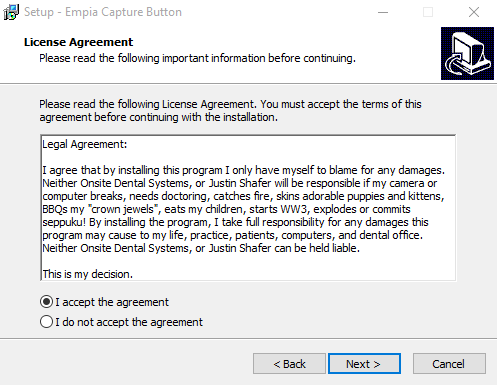
Added an awesome legal agreement
Re: Intra-Oral Capture Button Software
Posted: Wed May 20, 2015 9:20 pm
by Justin Shafer
Updated to 4.50
Finally got VixWin with 64bit down.. requires GX-Picture 3.5.3 and VixWin Platinum 3.3
Re: Intra-Oral Capture Button Software
Posted: Sat May 23, 2015 8:28 am
by bazooka
Ummm... Can anyone please tell me which camera should i buy which works with most of the softwares out there? I was looking into MD740 and MD960. But there are so many versions of MD740, like AZDENT,PRODENT,MAGNATA etc... Which one should i buy if i go the MD740 route? Can someone plz give me a link on ebay where i can buy any good sub $180 camera.Thanks
Re: Intra-Oral Capture Button Software
Posted: Tue Jun 02, 2015 2:41 am
by Justin Shafer
FREE IntraOral Camera Software for the snapshot\capture button!!
Version 4.60.00 (BEEN TESTED FOR 1 DAY AS OF 06/02/2015)
Added strmbase.lib
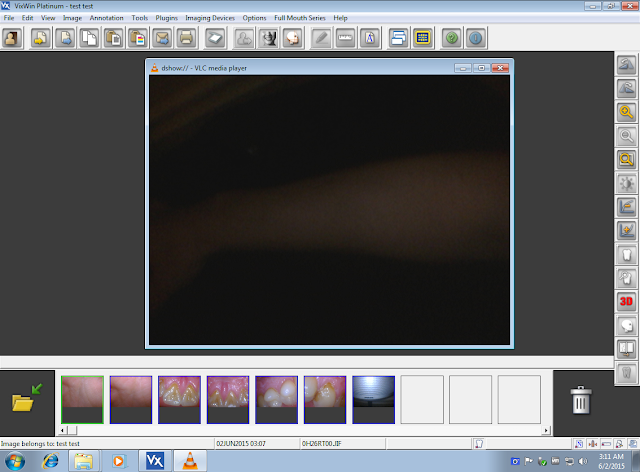
Switched to VLC Player for VixWin ALL VERSIONS. No more GX-Picture!
VLC Player is part of the install!
YAY!!!!!!!!!!!!!!!!!!!!!!
Re: Intra-Oral Capture Button Software
Posted: Tue Jun 02, 2015 2:42 am
by Justin Shafer
bazooka wrote:Ummm... Can anyone please tell me which camera should i buy which works with most of the softwares out there? I was looking into MD740 and MD960. But there are so many versions of MD740, like AZDENT,PRODENT,MAGNATA etc... Which one should i buy if i go the MD740 route? Can someone plz give me a link on ebay where i can buy any good sub $180 camera.Thanks
FocusDent MD-740.. just because... I think Arunas is cool..
DY-50 works.
ProDent 740 works...
Magenta.. is the manufacturer..
Re: Intra-Oral Capture Button Software
Posted: Mon Jun 08, 2015 10:34 am
by bazooka
What is Arunas? Also can you please give me any EBAY link for a reliable MD-740? Thank you very much.
Re: Intra-Oral Capture Button Software
Posted: Tue Jun 09, 2015 4:52 pm
by Justin Shafer
Re: Intra-Oral Capture Button Software
Posted: Fri Jun 19, 2015 4:03 pm
by darwin08
Interesting software. Do you have a hint for the password hint

Re: Intra-Oral Capture Button Software
Posted: Sat Jun 20, 2015 9:01 pm
by Justin Shafer
darwin08 wrote:Interesting software. Do you have a hint for the password hint
https://www.youtube.com/watch?v=YkADj0TPrJA
Re: Intra-Oral Capture Button Software
Posted: Thu Aug 06, 2015 7:07 pm
by Justin Shafer
Version 5.00
* Added the SuperVista Camera because of the new etLib2_Init (not very well tested)
* Switched to etLib2_Init_with_VidPid (YAY!)
* Camera Icon remains if explorer.exe reloads
* Updated VJoy SDK
Might have a newer Twain driver soon instead of VideoDS.ds
Re: Intra-Oral Capture Button Software
Posted: Fri Aug 07, 2015 11:49 am
by papacheek
Hi Justin,
Many thanks for all the work you have done on these. It's been a great help. I can't seem to make the capture button work on our system. Using a MD740, Apteryx 4.0.0.3, on a windows 8.1 pro, OD 15.2.12. I'm sure that I'm doing something wrong, Video looks great, just have to click mouse to capture. Any thoughts?
Re: Intra-Oral Capture Button Software
Posted: Wed Aug 19, 2015 5:31 am
by Justin Shafer
Well, with Apteryx you won't need my capture button program to use the camera. Camera should be configured for Still Pin, and in the capture button menu...
Just watch.
https://www.youtube.com/watch?v=_OkLvcU89C0
Re: Intra-Oral Capture Button Software
Posted: Thu Sep 17, 2015 2:37 pm
by Justin Shafer
Intraoral Camera Software for the snapshot\capture button!!
Version 5.30
*Added Dexis and Gendex Cameras!!!!! (Woot! Woot!)
DexCam2 & 3, Gendex eZ1 & GXC-300 Capture Buttons now work.
Re: Intra-Oral Capture Button Software
Posted: Sun Sep 20, 2015 12:58 pm
by Justin Shafer
http://justinshafer.blogspot.com/2014/0 ... -ebay.html
Version 5.35
I changed VideoDS.ds to have a higher frame rate, and a larger window size, and a customized name.
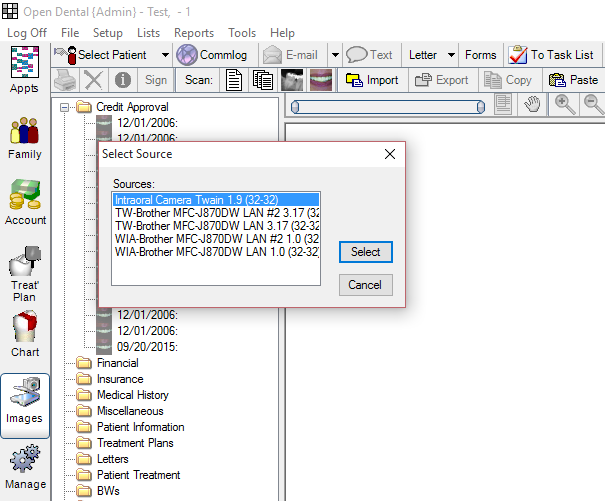
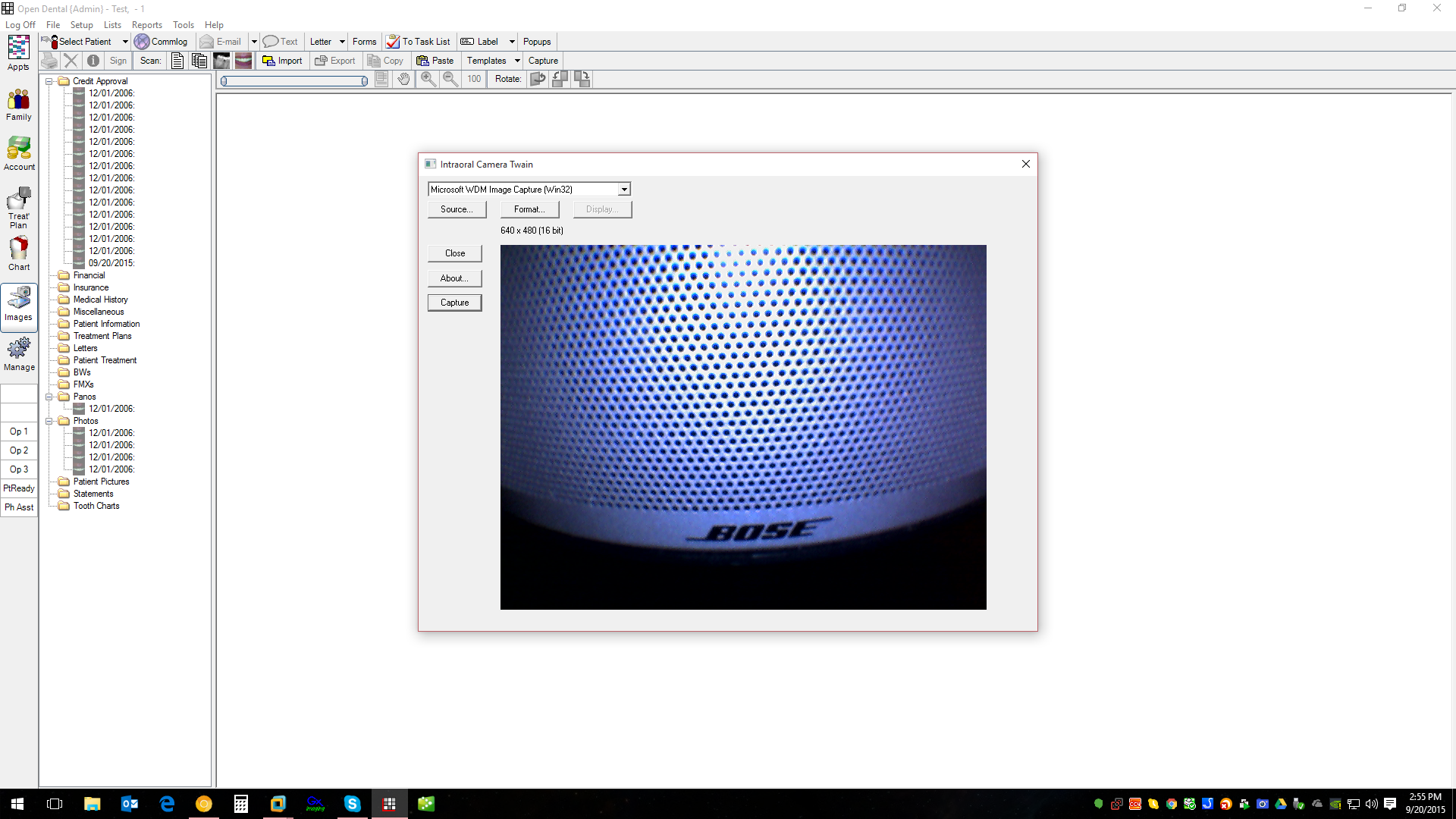
Twain all by itself, without capture button functionality (you will need my program for that)
http://www.onsitedentalsystems.com/VideoDS.zip
Re: Intra-Oral Capture Button Software
Posted: Mon Sep 21, 2015 12:59 pm
by Korack
[yup my bad]
Re: Intra-Oral Capture Button Software
Posted: Mon Sep 21, 2015 5:00 pm
by Justin Shafer
Thanks for looking out for me.
Re: Intra-Oral Capture Button Software
Posted: Sun Oct 11, 2015 3:27 am
by Justin Shafer
Version 5.50
Added the DigiDoc and Claris Cameras (NET Library).
That should be most of the cameras.
Re: Intra-Oral Capture Button Software
Posted: Fri Oct 23, 2015 12:53 pm
by jac
Thanks so much for all your hard work, Justin. I'm having trouble when trying to get it to work w/ a MD-740 camera on Open Dental and Cliosoft.
We figured out how to install your driver and get it to work on cliosoft but then it knocked out the driver for my xray sensor as both camerea and sensor use the name "DentalUSB". Any hints as you now have it working for claris (a cliosoft product). When the cliosoft tech reinstalled the sensor driver, the camera stopped working in both open dental and cliosoft... three late nights down the tube... ugh. any help would be greatly appreciated!!
Re: Intra-Oral Capture Button Software
Posted: Tue Dec 01, 2015 4:58 am
by Justin Shafer
jac wrote:Thanks so much for all your hard work, Justin. I'm having trouble when trying to get it to work w/ a MD-740 camera on Open Dental and Cliosoft.
We figured out how to install your driver and get it to work on cliosoft but then it knocked out the driver for my xray sensor as both camerea and sensor use the name "DentalUSB". Any hints as you now have it working for claris (a cliosoft product). When the cliosoft tech reinstalled the sensor driver, the camera stopped working in both open dental and cliosoft... three late nights down the tube... ugh. any help would be greatly appreciated!!
I would have to look at ClioSoft and make sure you have the right camera, etc. I have seen some knock off 740's that don't have an Empia chip.
Give me a shout! Since it is Claris, it most likely can be used with the Virtual Joystick, since all their camera drivers use that, but it is possible that won't work and something else might like keyboard keystrokes that I can program in.
Re: Intra-Oral Capture Button Software
Posted: Tue Dec 01, 2015 4:59 am
by Justin Shafer
Added Version 5.80
*Added Apixia
*Changed the way the 2580 and 2780 detection works to make life easier on myself and others. Tries to use many pid's until it finds a match.
Re: Intra-Oral Capture Button Software
Posted: Sun Dec 13, 2015 3:08 pm
by Justin Shafer
5.83...
Added support for Handy Dental Cameras.....
And some new camera I have never used that does 1280x720P for $500 HDI-220B. Comes with a Twain Driver.
http://www.atomodental.com/products/intraoral-camera
Re: Intra-Oral Capture Button Software
Posted: Fri Jan 01, 2016 2:29 pm
by Justin Shafer
I got Cliosoft to work. It requires the name of the camera be changed to suit their needs. So if you have 64bit the driver won't be signed, so you have to disable driver signature enforcement, and if you use secureboot\bitlocker on a workstation then that must be disabled, OR use a Virtual Camera like ManyCam per workstation. I have tried some other albeit free camera software but I doubt it would work on Cliosoft.. but ManyCam does.
=)
Camera must be called USB 2860 Device (at least that is the one I tested)
Other possible names USB 2860 Video, Hi-Speed Video Grabber (ManyCam won't allow a dash)
And THEN you will need my capture button software. Not easy, but doable.
edit: this is probably the best bet if you have bitlocker\secureboot and Windows 8\10... I usually change the inf and other stuff... but.. I like this....
Hmmmm...
I wrote 3 batch files, this is one, it changes your camera name to "USB 2860 Video" for Cliosoft.. Added the option to run it from the Camera app.
\\revert
"C:\Program Files\Capture Button\Fixes\regfind.exe" "Hi-Speed USB Video Grabber" -p "HKEY_LOCAL_MACHINE\SYSTEM\CurrentControlSet\Control\DeviceClasses\{65E8773D-8F56-11D0-A3B9-00A0C9223196}" -r "USB Video Device"
"C:\Program Files\Capture Button\Fixes\regfind.exe" "Hi-Speed USB Video Grabber" -p "HKEY_LOCAL_MACHINE\SYSTEM\CurrentControlSet\Control\DeviceClasses\{6994AD05-93EF-11d0-A3CC-00A0C9223196}" -r "MD"
"C:\Program Files\Capture Button\Fixes\regfind.exe" "Hi-Speed USB Video Grabber" -p "HKEY_LOCAL_MACHINE\SYSTEM\CurrentControlSet\Control\Class\{6BDD1FC6-810F-11D0-BEC7-08002BE2092F}" -r "MD"
"C:\Program Files\Capture Button\Fixes\regfind.exe" "USB 2860 Video" -p "HKEY_LOCAL_MACHINE\SYSTEM\CurrentControlSet\Control\DeviceClasses\{65E8773D-8F56-11D0-A3B9-00A0C9223196}" -r "USB Video Device"
"C:\Program Files\Capture Button\Fixes\regfind.exe" "USB 2860 Video" -p "HKEY_LOCAL_MACHINE\SYSTEM\CurrentControlSet\Control\DeviceClasses\{6994AD05-93EF-11d0-A3CC-00A0C9223196}" -r "MD"
"C:\Program Files\Capture Button\Fixes\regfind.exe" "USB 2860 Video" -p "HKEY_LOCAL_MACHINE\SYSTEM\CurrentControlSet\Control\Class\{6BDD1FC6-810F-11D0-BEC7-08002BE2092F}" -r "MD"
"C:\Program Files\Capture Button\Fixes\regfind.exe" "USB 2860 Device" -p "HKEY_LOCAL_MACHINE\SYSTEM\CurrentControlSet\Control\DeviceClasses\{65E8773D-8F56-11D0-A3B9-00A0C9223196}" -r "USB Video Device"
"C:\Program Files\Capture Button\Fixes\regfind.exe" "USB 2860 Device" -p "HKEY_LOCAL_MACHINE\SYSTEM\CurrentControlSet\Control\DeviceClasses\{6994AD05-93EF-11d0-A3CC-00A0C9223196}" -r "MD"
"C:\Program Files\Capture Button\Fixes\regfind.exe" "USB 2860 Device" -p "HKEY_LOCAL_MACHINE\SYSTEM\CurrentControlSet\Control\Class\{6BDD1FC6-810F-11D0-BEC7-08002BE2092F}" -r "MD"
"C:\Program Files\Capture Button\Fixes\regfind.exe" "USB 2861 Video" -p "HKEY_LOCAL_MACHINE\SYSTEM\CurrentControlSet\Control\DeviceClasses\{65E8773D-8F56-11D0-A3B9-00A0C9223196}" -r "MD"
"C:\Program Files\Capture Button\Fixes\regfind.exe" "USB 2861 Video" -p "HKEY_LOCAL_MACHINE\SYSTEM\CurrentControlSet\Control\DeviceClasses\{6994AD05-93EF-11d0-A3CC-00A0C9223196}" -r "MD"
"C:\Program Files\Capture Button\Fixes\regfind.exe" "USB 2861 Video" -p "HKEY_LOCAL_MACHINE\SYSTEM\CurrentControlSet\Control\Class\{6BDD1FC6-810F-11D0-BEC7-08002BE2092F}" -r "MD"
\\change
"C:\Program Files\Capture Button\Fixes\regfind.exe" "USB Video Device" -p "HKEY_LOCAL_MACHINE\SYSTEM\CurrentControlSet\Control\DeviceClasses\{65E8773D-8F56-11D0-A3B9-00A0C9223196}" -r "USB 2860 Video"
"C:\Program Files\Capture Button\Fixes\regfind.exe" "MD" -p "HKEY_LOCAL_MACHINE\SYSTEM\CurrentControlSet\Control\DeviceClasses\{65E8773D-8F56-11D0-A3B9-00A0C9223196}" -r "USB 2860 Video"
"C:\Program Files\Capture Button\Fixes\regfind.exe" "MD" -p "HKEY_LOCAL_MACHINE\SYSTEM\CurrentControlSet\Control\DeviceClasses\{6994AD05-93EF-11d0-A3CC-00A0C9223196}" -r "USB 2860 Video"
"C:\Program Files\Capture Button\Fixes\regfind.exe" "MD" -p "HKEY_LOCAL_MACHINE\SYSTEM\CurrentControlSet\Control\Class\{6BDD1FC6-810F-11D0-BEC7-08002BE2092F}" -r "USB 2860 Video"
reg.exe Add "HKLM\Software\USB2800\TwainDS" /v "DSName" /d "USB 2860 Video" /f
reg.exe Add "HKLM\Software\USB2800\TwainDS" /v "RealDSName" /d "USB 2860 Video" /f
\\revert
"C:\Program Files (x86)\Capture Button\Fixes\regfind.exe" "Hi-Speed USB Video Grabber" -p "HKEY_LOCAL_MACHINE\SYSTEM\CurrentControlSet\Control\DeviceClasses\{65E8773D-8F56-11D0-A3B9-00A0C9223196}" -r "USB Video Device"
"C:\Program Files (x86)\Capture Button\Fixes\regfind.exe" "Hi-Speed USB Video Grabber" -p "HKEY_LOCAL_MACHINE\SYSTEM\CurrentControlSet\Control\DeviceClasses\{6994AD05-93EF-11d0-A3CC-00A0C9223196}" -r "MD"
"C:\Program Files (x86)\Capture Button\Fixes\regfind.exe" "Hi-Speed USB Video Grabber" -p "HKEY_LOCAL_MACHINE\SYSTEM\CurrentControlSet\Control\Class\{6BDD1FC6-810F-11D0-BEC7-08002BE2092F}" -r "MD"
"C:\Program Files (x86)\Capture Button\Fixes\regfind.exe" "USB 2860 Video" -p "HKEY_LOCAL_MACHINE\SYSTEM\CurrentControlSet\Control\DeviceClasses\{65E8773D-8F56-11D0-A3B9-00A0C9223196}" -r "USB Video Device"
"C:\Program Files (x86)\Capture Button\Fixes\regfind.exe" "USB 2860 Video" -p "HKEY_LOCAL_MACHINE\SYSTEM\CurrentControlSet\Control\DeviceClasses\{6994AD05-93EF-11d0-A3CC-00A0C9223196}" -r "MD"
"C:\Program Files (x86)\Capture Button\Fixes\regfind.exe" "USB 2860 Video" -p "HKEY_LOCAL_MACHINE\SYSTEM\CurrentControlSet\Control\Class\{6BDD1FC6-810F-11D0-BEC7-08002BE2092F}" -r "MD"
"C:\Program Files (x86)\Capture Button\Fixes\regfind.exe" "USB 2860 Device" -p "HKEY_LOCAL_MACHINE\SYSTEM\CurrentControlSet\Control\DeviceClasses\{65E8773D-8F56-11D0-A3B9-00A0C9223196}" -r "USB Video Device"
"C:\Program Files (x86)\Capture Button\Fixes\regfind.exe" "USB 2860 Device" -p "HKEY_LOCAL_MACHINE\SYSTEM\CurrentControlSet\Control\DeviceClasses\{6994AD05-93EF-11d0-A3CC-00A0C9223196}" -r "MD"
"C:\Program Files (x86)\Capture Button\Fixes\regfind.exe" "USB 2860 Device" -p "HKEY_LOCAL_MACHINE\SYSTEM\CurrentControlSet\Control\Class\{6BDD1FC6-810F-11D0-BEC7-08002BE2092F}" -r "MD"
"C:\Program Files (x86)\Capture Button\Fixes\regfind.exe" "USB 2861 Video" -p "HKEY_LOCAL_MACHINE\SYSTEM\CurrentControlSet\Control\DeviceClasses\{65E8773D-8F56-11D0-A3B9-00A0C9223196}" -r "MD"
"C:\Program Files (x86)\Capture Button\Fixes\regfind.exe" "USB 2861 Video" -p "HKEY_LOCAL_MACHINE\SYSTEM\CurrentControlSet\Control\DeviceClasses\{6994AD05-93EF-11d0-A3CC-00A0C9223196}" -r "MD"
"C:\Program Files (x86)\Capture Button\Fixes\regfind.exe" "USB 2861 Video" -p "HKEY_LOCAL_MACHINE\SYSTEM\CurrentControlSet\Control\Class\{6BDD1FC6-810F-11D0-BEC7-08002BE2092F}" -r "MD"
\\change
"C:\Program Files (x86)\Capture Button\Fixes\regfind.exe" "USB Video Device" -p "HKEY_LOCAL_MACHINE\SYSTEM\CurrentControlSet\Control\DeviceClasses\{65E8773D-8F56-11D0-A3B9-00A0C9223196}" -r "USB 2860 Video"
"C:\Program Files (x86)\Capture Button\Fixes\regfind.exe" "MD" -p "HKEY_LOCAL_MACHINE\SYSTEM\CurrentControlSet\Control\DeviceClasses\{65E8773D-8F56-11D0-A3B9-00A0C9223196}" -r "USB 2860 Video"
"C:\Program Files (x86)\Capture Button\Fixes\regfind.exe" "MD" -p "HKEY_LOCAL_MACHINE\SYSTEM\CurrentControlSet\Control\DeviceClasses\{6994AD05-93EF-11d0-A3CC-00A0C9223196}" -r "USB 2860 Video"
"C:\Program Files (x86)\Capture Button\Fixes\regfind.exe" "MD" -p "HKEY_LOCAL_MACHINE\SYSTEM\CurrentControlSet\Control\Class\{6BDD1FC6-810F-11D0-BEC7-08002BE2092F}" -r "USB 2860 Video"
reg.exe Add "HKLM\Software\USB2800\TwainDS" /v "DSName" /d "USB 2860 Video" /f
reg.exe Add "HKLM\Software\USB2800\TwainDS" /v "RealDSName" /d "USB 2860 Video" /f
Stardard users won't have permissions to do this..... so if a new camera is added or if a new usb port sees the camera, an admin will have to run this.
Oh well it is what it is, no more messing with virtual camera code... Security is annoying.
Re: Intra-Oral Capture Button Software
Posted: Fri Jan 01, 2016 10:29 pm
by Justin Shafer
Intraoral Camera Software for the snapshot\capture button!!
Version 5.85
* Added AZ-970U Camera by name (Seems to be a branded MD-960U?)
* Added the ability to rename cameras (Be careful, if you use another camera on the same computer!!)
* Fixed a bug when you close the program
* Added support for Cliosoft (Hence camera renaming, and bitlocker!!)
Re: Intra-Oral Capture Button Software
Posted: Sat Feb 06, 2016 12:24 pm
by lwolniak
Quick question. I have a Digi Doc camera and am using iRys imaging software for my MyRay sensors. The camera works well with the twain device and OD bridge, but its a huge PITA to have to manually import everything. Also not so sure about the resolution quality the current driver is allowing for. Justin, your software and knowledge is most impressive. Would this version of the software put the images from iRys into OD?
Re: Intra-Oral Capture Button Software
Posted: Thu Feb 11, 2016 7:27 pm
by Justin Shafer
Contact me! iRys Imaging Software eh? It is better to attempt to put the images in there usually, otherwise if you want them in OD you must use multi-page twain (scan to document) which saves your images as a pdf file. I recommend using the x-ray software until Open Dental starts to use DirectShow for cameras instead of Twain or maybe an option.
http://onsitedentalsystems.com/contact.htm
I may end up adding IRys to my program... "Whats one more?"
Re: Intra-Oral Capture Button Software
Posted: Thu Feb 18, 2016 1:00 pm
by lwolniak
Justin, that would be awesome! You should consider making a universal imaging importer (IOpics, radiographs)...I bet you could retire within a year (if not already)
Re: Intra-Oral Camera Snapshot Software
Posted: Sat Jul 16, 2016 4:44 pm
by Justin Shafer
IOC Snapshot (IntraOral Camera Snapshot Software)
Version 1.03 (07/16/2016)
* Added Support for HDI-200 Camera
* Switched to Visual Studio 2010 SP1
* Now using 1 Kodak\Caresteam option
* Minor bug fixes
Next I will work on Digora Imaging Software.
Re: Intra-Oral Camera Snapshot Software
Posted: Mon Jul 18, 2016 11:06 pm
by Justin Shafer
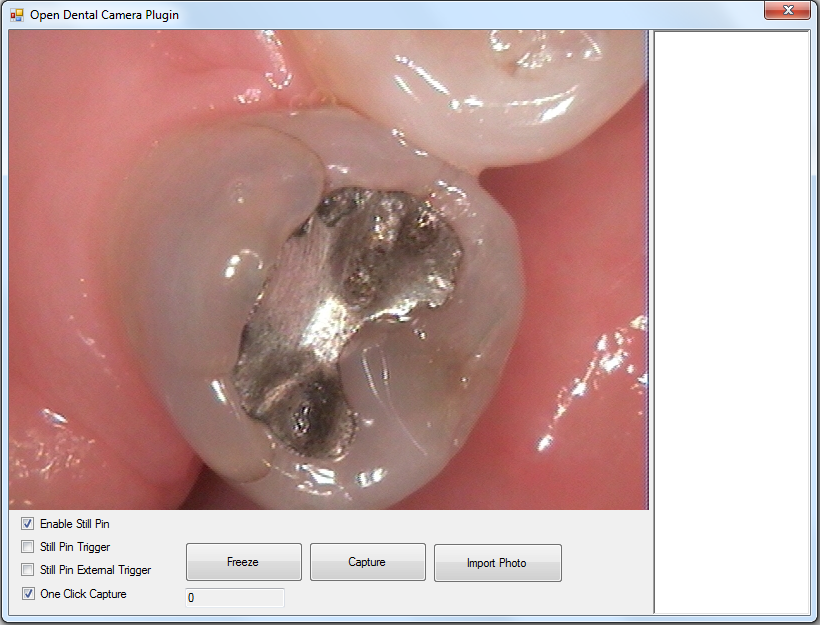
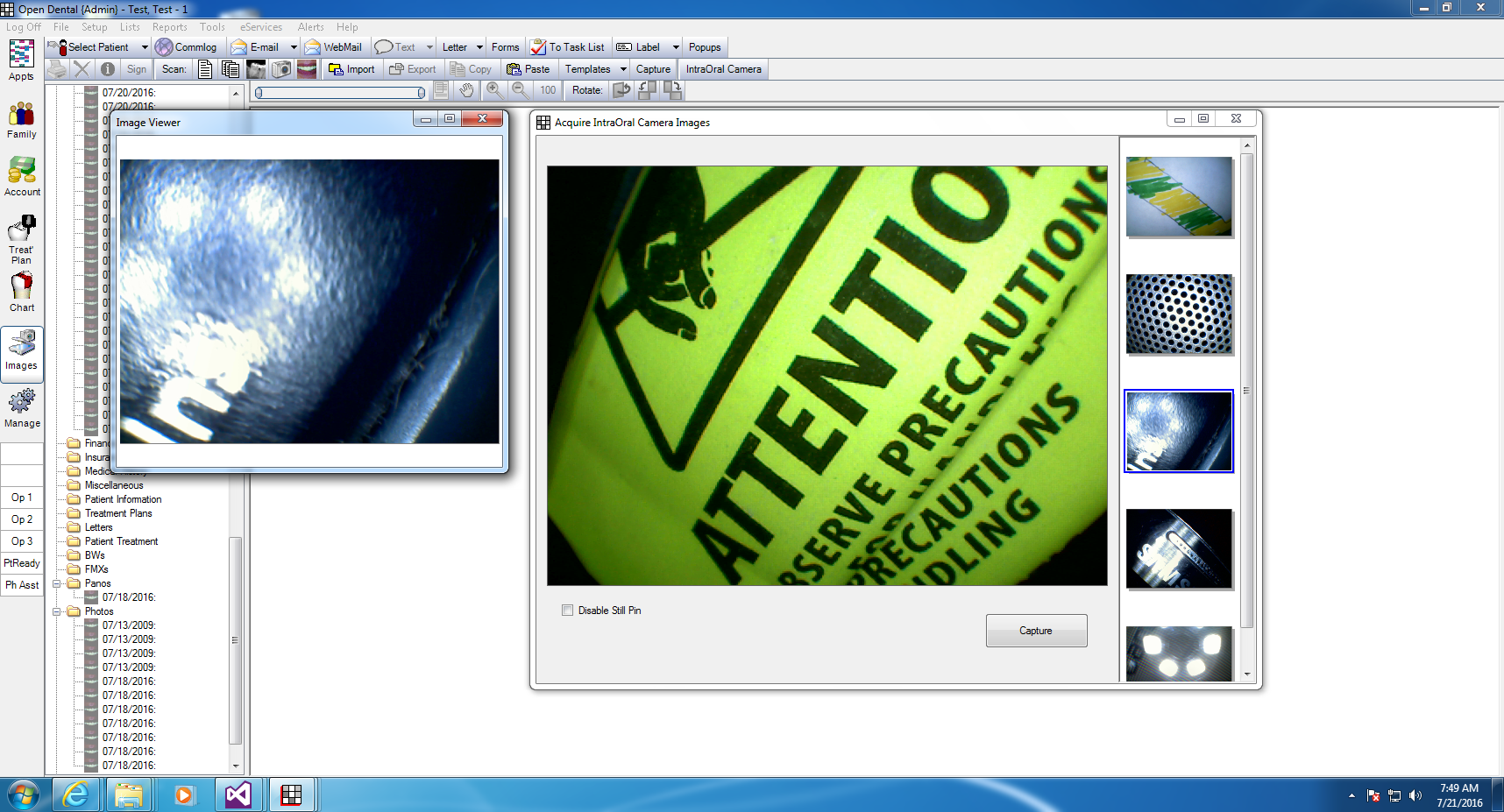
Added the ability to capture an image from a usb camera that uses a Still OR Capture Pin to Open Dental 16.2. Tested with the MD-740 and MD-960U.
For my own fun.. not sure what to do about it. You press the button on the camera and it takes an image, when finished open dental will ask to assign the images. No drivers or software to install.
I changed the Scan Photo icon to an image of a camera, and I added a new icon that used the Scan Photo Icon, and changed that to the IntraOralCamera Form.
Re: Intra-Oral Camera Snapshot Software
Posted: Wed Nov 23, 2016 9:19 pm
by Justin Shafer
Version 1.08!
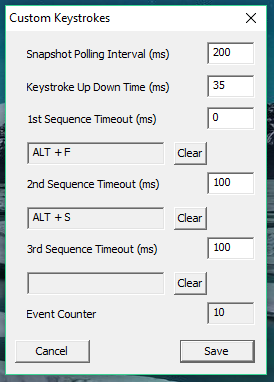
Custom Keystrokes added!
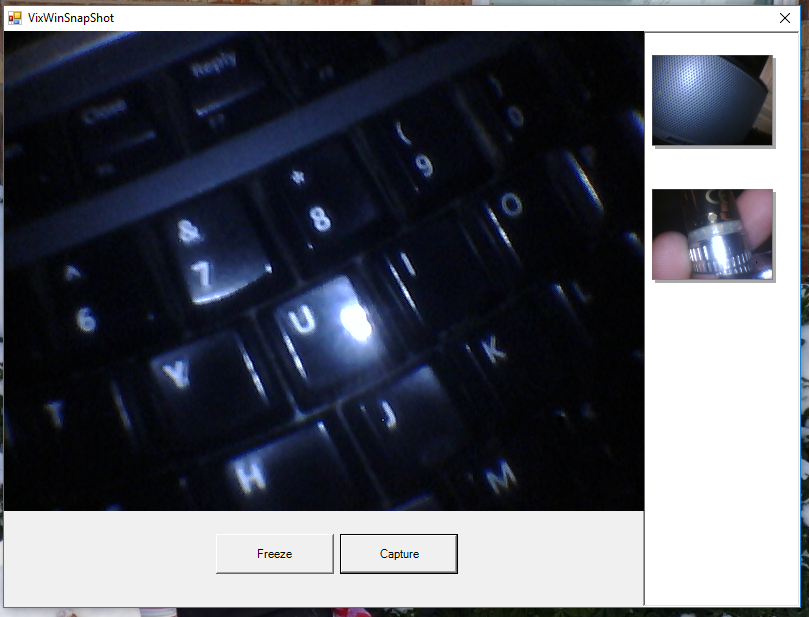
New VixWin Interface!
 Ability to use Non Empia Cameras!
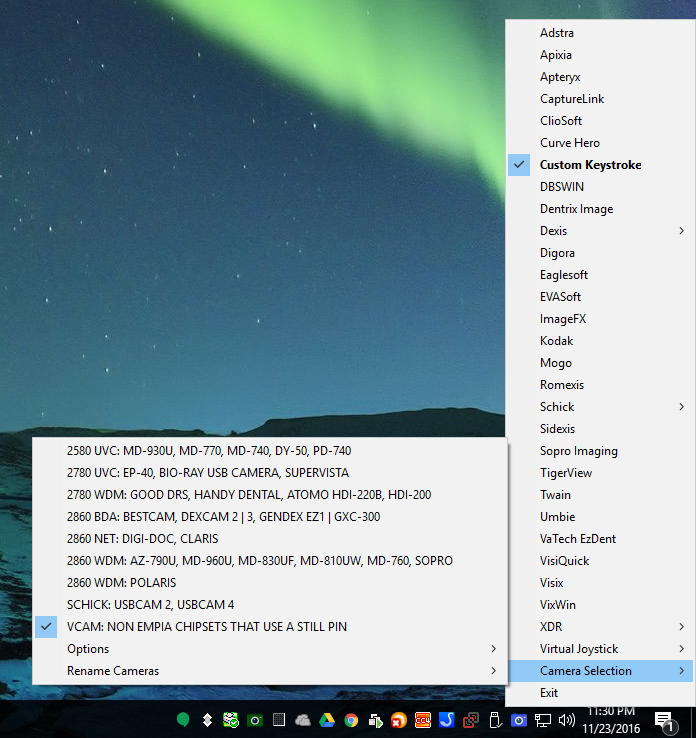
By using a virtual camera that connects to a physical camera and detects still pin button presses while your imaging software uses the virtual camera! My program detects the button presses and can emit keystrokes. This was a TON of work. BETA!

For ImageMaster cameras that use a Still Pin and knock off MD-740 cameras. When you order the Image Master you have the option of adding a separate chip that can emit joystick events but not everyone does or needs it. The virtual camera comes from MultiCamFilter.
https://github.com/johnmaccormick/MultiCam
Cosmetic and threading improvements (the system tray icons no longer reload when you plugin or unplug a camera)
Re: Intra-Oral Camera Snapshot Software
Posted: Mon Jun 26, 2017 11:36 am
by gthiele
$51 camera. Has anyone tried one of these out?
https://www.amazon.com/dp/B01N44NTZU?psc=1
Re: Intra-Oral Camera Snapshot Software
Posted: Sat Jul 29, 2017 12:58 pm
by Justin Shafer
This software is now being sold per operatory. Will include the Open Dental Plugin that can take snapshots off the camera's button. The free plugin I have posted on my website does NOT work off the camera's button and requires a foot pedal or mouse or keyboard.
Re: Intra-Oral Camera Snapshot Software
Posted: Thu Aug 17, 2017 1:42 pm
by sbgcd
Justin - can you advise how one can buy this software/plugin? Thank you.
Re: Intra-Oral Camera Snapshot Software
Posted: Sat Dec 23, 2017 4:22 am
by Justin Shafer
I added support for this camera today. Tested with VixWin and my Open Dental Plugin so far. Works well.
Re: Intra-Oral Camera Snapshot Software
Posted: Sat Dec 23, 2017 4:39 am
by Justin Shafer
sbgcd wrote:Justin - can you advise how one can buy this software/plugin? Thank you.
Email me at justinshafer at gmail dot com. Thanks!
Re: Intra-Oral Camera Snapshot Software
Posted: Mon Jan 22, 2018 12:22 pm
by opd
Hi Justin, I am trying to get IOC Snapshot working with a MD740B Camera and the "Custom Keystrokes". I installed the last version, but it does not recognize the snapshot button. Any ideas?
I just want to define a custom keystroke for the snapshot button.
Re: Intra-Oral Camera Snapshot Software
Posted: Mon Jan 22, 2018 1:27 pm
by Justin Shafer
opd wrote:Hi Justin, I am trying to get IOC Snapshot working with a MD740B Camera and the "Custom Keystrokes". I installed the last version, but it does not recognize the snapshot button. Any ideas?
I just want to define a custom keystroke for the snapshot button.
Someone in germany emailed me about that.. is that you?
Edit: Yes it is him. Had to edit the source code for the Virtual Camera because in germany the "Still" pin is called "Standbild" or Freeze Frame.
Re: Intra-Oral Camera Snapshot Software
Posted: Sat Oct 23, 2021 12:58 am
by Justin Shafer
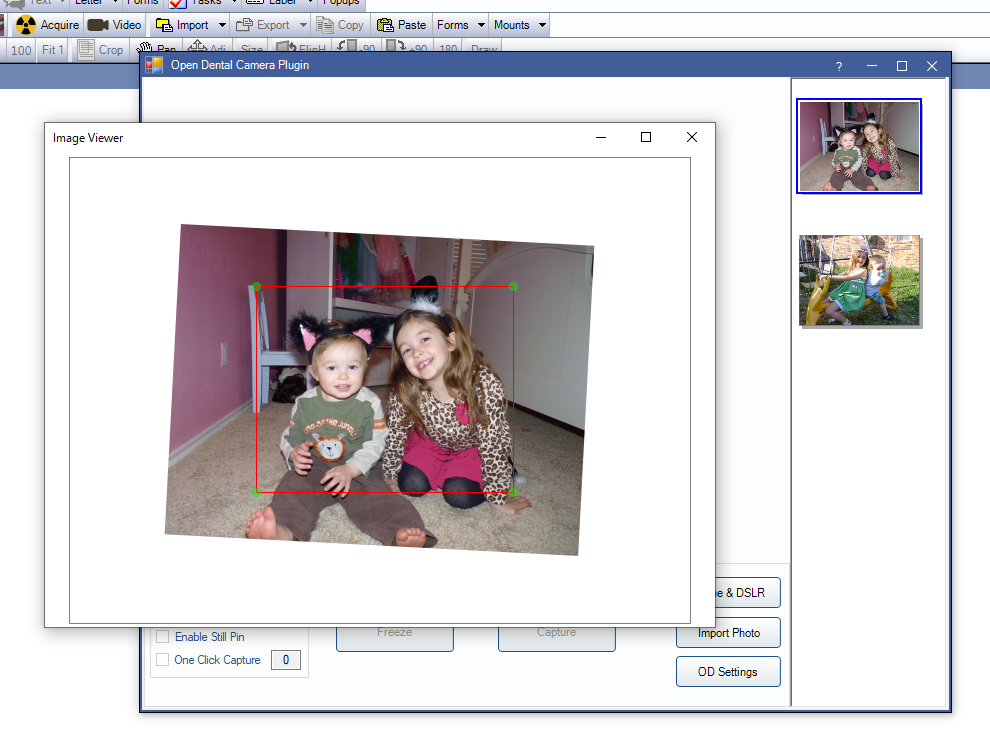
I added the ability to crop and rotate photos in IOC Snapshot "Open Dental Camera" plugin. This allows you to crop the photos before they are sent to Open Dental. Currently you cannot crop photos once they are in a mount in Open Dental, at least not easily. So this should work.
Double click the image in the image viewer to bring up the crop tool. up and down arrow keys on the keyboard will rotate the image. If you close the window with the crop tool open, then that cropped image will be over write the original.
You can also save images directly to a mount.