Page 1 of 1
Google calendar sync
Posted: Sun Jan 05, 2020 12:32 pm
by remdent
Is there a way to sync the schedule w/ Google Calendar? I saw one but it was from 2016 and not sure if it's compatible with newer versions of OD.
Re: Google calendar sync
Posted: Mon Jan 06, 2020 9:08 am
by rhaber123
It is compatible. just be sure to pick your version, or the closest one, from the download website
https://www.opendentalsoft.com:8085/for ... f=7&t=6932
We have been using it for 3 years now.
you can download the trial, and test it for 30 days. Minh at Mopensoft ( Australia) keep it updated with all OD Newsest version. ,
When you click on the download option, you will see multiple versions that correspond to many of OD versions, old and new, be sure you pick the right one that matches your OD version or the closest one
Minh at
www.mopensoft.com can be reached directly
info@mopensoft.com
Re: Google calendar sync
Posted: Tue Jun 08, 2021 2:40 pm
by surefeel
My google calendar syncing is duplicating and in some point it stop working because of too many schedules. I am using mopensoft and simpleybook.me. The calendar which is two way syncing with simplybook.me is only duplicating. The others look fine. So I think it is something from simplybook.me and google calendar. It begin to happen after recent update. Anyone has same issue and knows solution?
Re: Google calendar sync
Posted: Tue Jun 08, 2021 8:36 pm
by rhaber123
Once this happen, the easiest way to fix it is to delete the calendars in google, and receate the calendars in Google with the SAME NAMES.
The bad calendars now are deleted, and the new ones will be more accurate
Re: Google calendar sync
Posted: Wed Jun 09, 2021 8:46 pm
by surefeel
Thanks. I will try it.
Re: Google calendar sync
Posted: Fri Jul 23, 2021 7:44 pm
by Andrea
surefeel wrote: Tue Jun 08, 2021 2:40 pm
My google calendar syncing is duplicating and in some point it stop working because of too many schedules. I am using mopensoft and simpleybook.me. The calendar which is two way syncing with simplybook.me is only duplicating. The others look fine. So I think it is something from simplybook.me and google calendar. It begin to happen after recent update. Anyone has same issue and knows solution?
yes I had endless problems with this and Minh, who made the sync plugin was unable to help. In the end we wrote our own program and in the process worked out what the problem is with the mopensoft one. It is an issue with the plugin and I have let Mopensoft know what it is. In the meantime delete and recreate the calendar as per the earlier reply, seeing if you can limit the amount of appointments it syncs to under 300. I can't remember if there's a way of limiting how far into the future it syncs or not sorry. The problem will periodically recur without limiting the number of appointments until the software is fixed.
Re: Google calendar sync
Posted: Sat Jul 24, 2021 10:32 pm
by rhaber123
Yes, Simplybookme syncing was an issue.
In the last 5 years, this happened only once.
The easiest way to fix it is to delete the calendars in google, and recreate the calendars in Google with the SAME NAMES.
In our office, we limit our patients to be able to schedule only 2 months in the future, through Simplybookme calendar control panel.
Once fixed, this did not happen again.
No more problem
Mopensoft does that automatically now, so it is no longer an issue
Re: Google calendar sync
Posted: Tue Jun 18, 2024 7:57 am
by David
Hi! How do you do when you have multiple calendars ? (I mean, more than 5?)
Thanks,
David
Re: Google calendar sync
Posted: Wed Jun 19, 2024 8:42 am
by rhaber123
you can have as many calendars as you want and link them to OD, by giving the calendar IN GOOGLE the same name as the operatory in OPEN DENTAL
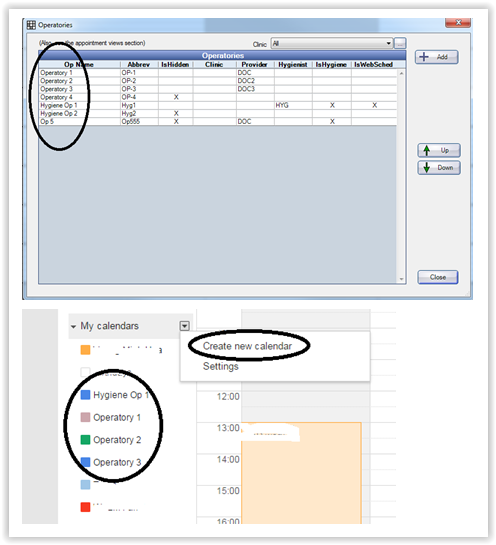
follow the instructions on how to set it up here
https://www.opendentalsoft.com:8085/for ... f=7&t=6932
Re: Google calendar sync
Posted: Thu Jun 20, 2024 12:17 am
by David
Thanks, it is perfectly clear, but In this case, all calendars are attached to ONE Google account, How can I do the same if I have multiple calendars from multiple Google accounts?
Thanks a lot!
Re: Google calendar sync
Posted: Thu Jun 20, 2024 10:54 am
by rhaber123
how many Open Dental Databases are you using?
Is it for a single office, or multiple offices?
Can you clarify , why you need multiple Google accounts?
(need more info)
There might be a workaround.
Re: Google calendar sync
Posted: Wed Jun 26, 2024 6:14 am
by David
My apologies for late response !
I'm not using Open Dental right now, At the moment I'm digging to understand if it is a good match for me.
My setup is a little bit complicated, I'm trying to explain :
I have one Gmail account that "represents" my business; under this account, each calendar represents a colleague + his office (ok we are only 2

).
So far so good, BUT
For certain treatments, we need a specific room. These specific rooms are shared across multiple practitioners in the building, and a different Gmail account handles availability ( and the important point is that we don't own this account, as it is a shared space)
To avoid double booking of the rooms we use a
calendar sync tool that combines the availabilities of the rooms, but I'm not sure I can replicate this setup in Open Dental without owning the room calendar.
Re: Google calendar sync
Posted: Wed Jun 26, 2024 10:44 am
by rhaber123
Do you have access to that Google Calendar?
Option 1 -
Don't use your Google Calendar account,
Don't use your Google Calendar account but Create your Calendars in the other Google account.
Now it is easy.
Sync "only" the calendars that you are interested in with Open Dental
option 2
Do it ALL inside that business MAIN Google Calendar
From that Main Google calendar, ask that administrator, to sync the calendar of these specific operatories to YOUR Google calendars.
I think that's how it is setup now. All the syncing is being done between multiple google calendars, inside Google.
option 3
use a 3RD PARTY booking service , like Simplybook.me, as a hub , to sync between calendars
option 4
if you dont have the credentials, contact that administrator and ask if they can sync that info to your google calendar, but you must give them your google calendar credentials
Once the sync is done, it will be easy.
Reach out to me directly if you need more info
Re: Google calendar sync
Posted: Thu Jun 27, 2024 1:15 pm
by David
Thanks a lot

! I'm seeing a path from here!
I'm trying to check what is possible with the "office manager" of the building, I can see that this is the crux of the problem
Re: Google calendar sync
Posted: Mon Aug 05, 2024 3:45 pm
by joergzastrau
Option 5: Install n8n and get a student to adapt the open source solution provided for free in the open dental forum to your like. Shouldn't take more than a day.
With best regards,
Joerg